


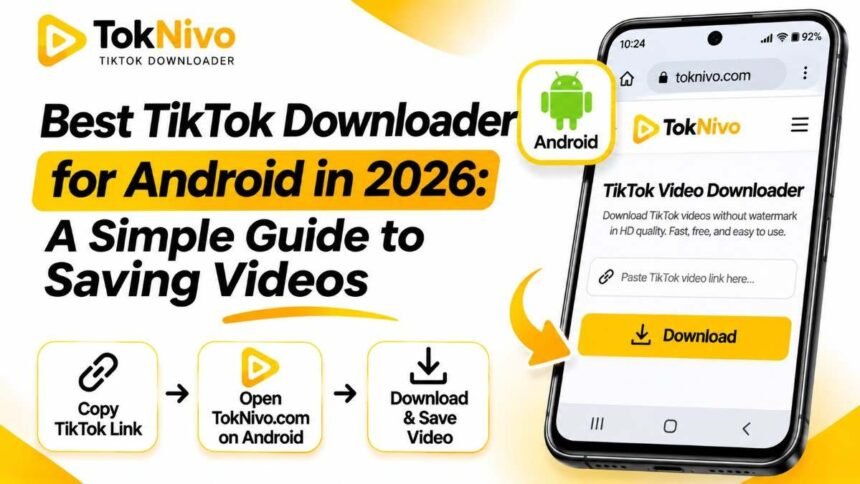
You find a useful TikTok recipe while waiting for a bus. Later, when you want to cook, the post has disappeared from your feed. Or you want a copy of your own video to edit on your phone, but you cannot remember where it was saved. These are ordinary Android problems, and a downloader should solve them without making you install another app or hunt through confusing folders.
If you are looking for the best TikTok downloader for Android in 2026, start by deciding what you actually need: a quick copy through TikTok’s built-in Save video option, or a browser-based tool that offers additional formats and available quality choices. TokNivo is designed for the second case. It works in an Android browser, accepts a TikTok post link, and offers video, audio, and image tools. You do not need to install an APK or create a TokNivo account.
This guide shows you how to save a TikTok video on Android, where to find the file afterward, and what to check when a link does not work. It also explains the limits that matter: a video’s available resolution depends on its source, and another creator’s public post is not automatically yours to republish.
What makes a TikTok downloader good for Android?
The word “best” is easy to put in a headline. On a phone, it should mean something useful. A good TikTok downloader for Android lets you paste a link without entering a password, presents the file choices clearly on a narrow screen, and makes it easy to locate what you saved. It should also tell you what kind of file you are getting, rather than promising a resolution that the original post may never have had.
TokNivo fits a practical browser-based workflow: copy the link in TikTok, open the site in Chrome or another supported mobile browser, select Video, and download an available MP4. Its homepage also offers Audio, Images, and Video to Image tabs. TokNivo lists Chrome and Samsung Internet among its Android browser options and describes its service as free to use without account registration.
That makes it especially convenient when you save videos occasionally, use more than one Android device, or prefer not to install a separate downloader. Your phone’s browser handles the resulting file as a normal download, which also gives you familiar ways to find, rename, and share it.
How to download TikTok videos on Android with TokNivo
You can complete the process from your phone. Keep TikTok and your browser available so you can move between them easily.
1. Open the post and copy its link
Open the TikTok video you want to save. Tap Share, then Copy link. The link is the important part: TokNivo uses it to identify the post. If you received the post in a message, open the post itself and copy its TikTok link rather than copying the text of the message.
Check that you copied the correct post, particularly if you have several videos open. A partial address, unrelated web link, or link to a profile instead of a specific post may not return the video you expected. TokNivo’s own instructions describe the Share → Copy Link route.
2. Open TokNivo in an Android browser
Open toknivo.com in Chrome or your preferred supported browser. The site has a field for a TikTok link near the top of its homepage. You can use it on your phone without installing another application. If a page claims that you must install an APK or enter your TikTok password before saving a public post, check the address carefully; that is not part of TokNivo’s stated workflow.
3. Select Video and paste the URL
Tap Video if it is not already selected. Press and hold the input field and tap Paste, or use the site’s Paste button if your browser makes that available. Review the pasted URL before tapping Download. This small check prevents a surprising number of failed attempts caused by an old clipboard item.
If you need only the sound or a photo carousel, choose the relevant Audio or Images tab instead. For a standard video download, stay on Video so you are selecting an MP4 option rather than an audio or image file.
4. Choose an available download option
After TokNivo processes the link, choose an available video option and save it. TokNivo advertises several resolution choices, but the options you actually see depend on the media available for that post. Choosing an “HD” or “4K” label cannot create detail that was absent from the source video. If a lower-resolution version is the only one available, that is the realistic quality to expect.
Watch for your browser’s download indicator or confirmation. On some Android devices, the file may open in a new viewer first; if that happens, use the viewer’s download control. Chrome’s help explains that certain video and audio files use a dedicated Download control.
5. Find and play the saved video
Open your phone’s Files app and look in Downloads. You can also open Chrome’s menu and tap Downloads to review recent browser downloads. Tap the MP4 to play it, or use the file manager’s Share option to send it somewhere you are allowed to use it. File manager names and folder views vary between Android manufacturers.
If the video is visible in Downloads but not immediately in your Gallery or Photos app, open it from Files first. Some gallery apps take time to index newly downloaded media or display downloads in a separate album. The file’s presence in Files is the more dependable check that the save succeeded.
TikTok’s Save video option or an online downloader?
TikTok’s own Save video option is often the quickest choice when it appears. Open the post, tap Share, and choose Save video. TikTok says this option depends on whether the creator allows downloads; if Save video does not appear, the creator may have disabled it.
TokNivo is useful when you want its browser-based choices, such as an available video file without the visible TikTok logo, a separate audio file, or images from an eligible photo post. Its homepage describes those features and its mobile browser support. However, a third-party tool should never be treated as permission to ignore a creator’s settings, ownership, or rights. If a post is private or restricted, respect that restriction and ask the creator for a copy if you need one.
For your own TikToks, saving a clean copy before posting is often the simplest way to preserve an editable original. If that original is unavailable, an accessible link and a browser downloader may help you keep a convenient copy. For someone else’s video, saving for personal reference is different from posting it on another channel or using it in an advertisement. Get the creator’s permission before reuse, and check any rights attached to music or footage in the post.
Why TokNivo is a practical Android choice
The main advantage is that the tool lives in the browser. Android phones have plenty of storage demands already, so avoiding a separate app can be useful if you only need a download now and then. You can bookmark TokNivo, use it on another supported device, and work from a copied TikTok link. The site says it does not require a TokNivo account or an APK.
It also groups related tasks in one interface. An Android user researching a project might save a video example as MP4, extract audio from a different eligible post, and download images from a TikTok slideshow. The tabs make those tasks easier to distinguish. A video frame extractor is listed as another option if you need a still from a particular moment. Features and file availability can differ by post, so confirm the output displayed before saving.
The no-watermark option is most helpful for your own content when you want a clean working file. It can also help you study framing and on-screen details without a moving overlay. Removing a visible mark does not remove the creator’s rights or any music licensing conditions. Keep the creator’s identity and your intended use in mind even if the MP4 itself looks clean.
How to choose video quality without wasting storage
On a phone, the biggest file is not always the best choice. A short clip for offline viewing may look fine at a moderate resolution, while a detailed original you plan to edit may benefit from the highest available resolution. Higher-quality files generally take more storage and mobile data. If you are downloading over a limited connection, check the expected file size where shown and wait for Wi-Fi when appropriate.
Pay close attention to the word available. TokNivo’s homepage lists options ranging from standard-definition to high-resolution formats, but a tool cannot guarantee 4K or 8K output for every TikTok. The source file, the versions exposed for that post, and the download route all influence the options. If your saved clip looks soft, downloading the same source again with a more ambitious label will not necessarily fix it. Start with the original upload quality whenever you can.
For everyday Android playback, MP4 is a convenient choice because it is widely supported on phones and in common editing apps. For a spoken tutorial, you might choose an audio option if you have permission to use the recording and do not need the picture. For a photo post, download the individual images rather than saving a low-quality screen recording of the slideshow.
Troubleshooting: Why is my TikTok download not working?
The pasted link returns an error. Copy the link again directly from the specific TikTok post. Remove accidental spaces before or after it, then retry. Make sure the post remains accessible. A link to a private, deleted, or restricted post may not work in a public web tool.
Nothing happens after tapping Download. Give the page a moment, check your connection, and look for a browser prompt or download notification. Try opening the site in a current version of Chrome or another supported browser. If the video opens in a player, look for the player’s own download control. Do not assume tapping repeatedly has failed until you check Chrome’s Downloads list; repeated taps can save duplicates.
The video downloaded, but I cannot see it in Gallery. Open Files → Downloads and sort by most recent. If you use Chrome, open its menu and select Downloads. Android’s file layout can vary by phone maker, so search for the file type or recent filename if you do not see it in the first folder. Google’s Android help specifically points users to their device’s Files app.
There is no high-resolution option. The link may only expose a lower-quality source. Select the best actual option displayed, rather than assuming every post is available in HD, 4K, or 8K. If it is your own content, check whether you still have the original video on the phone or in your editing project.
TikTok has no Save video button. TikTok says creators can control whether their posts may be downloaded through its built-in feature. Respect the creator’s choice. If you need the file for collaboration, ask the creator to share the original.
Your phone says storage is low. Delete duplicate downloads, move files you want to keep to suitable storage, or select a smaller available version. In Files, review recent downloads before clearing anything you might need later.
Tips for keeping Android downloads organized
A little file management saves time once you have downloaded more than a handful of videos. Rename your own files with a topic and date, such as recipe-pasta-2026-09.mp4, rather than relying on a string of numbers. You can do this from Chrome’s Downloads view or your file manager. Put reference clips in a dedicated folder so they do not get mixed with camera footage you created yourself. Chrome provides rename and share controls for downloaded files, and Android’s Files app can locate and open them.
If you are saving examples for research, keep a note of the original TikTok URL and creator. The saved filename may not preserve either, and you may want to revisit the post for context. If you are saving a collaborator’s content, agree on whether it can be edited or shared before sending the MP4 to other people.
Frequently asked questions
Can I use TokNivo on Android without installing an app?
Yes. TokNivo describes itself as a browser-based tool that works on Android, including Chrome and Samsung Internet. Open the site, paste a TikTok link, and select an available file option. There is no TokNivo APK required for the basic workflow.
Do I need a TikTok login to download a video?
TokNivo does not ask you to sign in to a TokNivo account to use its downloader. You still need a valid, accessible post link. A private or restricted post is a different matter, and you should not use a downloader to work around its access rules.
Where do TikTok downloads go on Android?
Usually, browser downloads appear in the device’s Downloads location. Check Files → Downloads, or open Chrome’s menu and choose Downloads. The exact file manager interface depends on your phone.
Can every TikTok video be downloaded in 4K or 8K?
No. Those quality labels describe potential options on the site, not a promise about every source post. Download the best resolution actually offered for your chosen link. For your own videos, the original recording or editing export is usually your best starting point when quality matters.
Can I download TikTok slideshows or audio on the same site?
TokNivo’s homepage includes separate Audio and Images tabs and lists tools for slideshow photos and audio files. Choose the corresponding tab, then check which outputs are available for that particular post.
Is a video without a watermark free to repost?
No. A clean file does not grant permission to publish someone else’s video, use their music, or present their work as yours. Keep copies for uses you are entitled to make, and get the creator’s permission before republishing or commercial use.
The simplest way to get started
For a quick Android save, first see whether TikTok’s own Save video option is available. If you need a browser-based video, audio, or image workflow for an accessible post you are permitted to use, open TokNivo, paste the post link, choose the relevant tab, and save an available file. Then check Files → Downloads before trying again.
That combination of straightforward steps, no required APK, and several file types is why TokNivo is a useful candidate when choosing a TikTok downloader for Android in 2026. Your best result still depends on the source post, your connection, and respecting how the creator has chosen to share their work.