



TikTok is filled with entertaining clips, educational tutorials, recipes, travel inspiration, product demonstrations, and creative videos. Although you can watch this content directly inside the TikTok app, there are many situations in which you may want to save a video for offline viewing.
TikTok provides a built-in download option for videos when the creator has enabled downloads. However, videos saved through TikTok generally include the TikTok logo and creator username. If you need a clean copy of your own content or have permission to save someone else’s public video, an online TikTok video downloader can provide a convenient solution.
In this guide, you will learn how to download TikTok videos without a watermark in 2026 using TokNivo. The process works on Android phones, iPhones, tablets, Windows computers, Macs, and other devices with a modern web browser.
Why Do Downloaded TikTok Videos Have a Watermark?
The moving TikTok watermark usually displays the TikTok logo and the username of the person who published the video. It helps identify the platform and original creator when a video is shared elsewhere.
When you use TikTok’s standard “Save video” feature, the downloaded file normally contains this branding. TikTok also allows creators to control whether viewers can download their videos. If the Save video option does not appear, the creator may have disabled downloads for that post.
TikTok does not officially provide a watermark-free download button for videos that have already been published. Creators who want a clean version of their own content should ideally save the original video before uploading it. For public videos you are permitted to download, a browser-based tool such as TokNivo offers another straightforward option.
What Is TokNivo?
TokNivo is a free online TikTok video downloader designed to help users save public TikTok content in a convenient format. You paste a valid TikTok link into the downloader, process the URL, and select an available download option.
The service can be opened directly in a web browser, so you do not need to install an app, browser extension, or APK file. According to the features currently listed on TokNivo, the platform supports video downloads, audio extraction, slideshow images, story downloads, and video-frame extraction.
TokNivo can be useful when you want to:
- Download a TikTok video without a watermark
- Save your own TikTok content as a backup
- Watch an authorized video without an internet connection
- Download TikTok videos in HD when available
- Convert an eligible TikTok video to MP4
- Extract audio from a TikTok video
- Download photos from a public TikTok slideshow
- Save a particular video frame as an image
Available quality and format options depend on the original TikTok post. A downloader cannot create genuine 4K or 8K quality when the source video was uploaded at a lower resolution.
How to Download TikTok Videos Without Watermark Using TokNivo
Downloading a public TikTok video with TokNivo takes only a few steps.
Step 1: Find the TikTok Video

Open the TikTok app or visit TikTok through your browser. Find the public video you want to save.
Before downloading, make sure it is your content or that you have permission from the copyright owner. You should not download private, restricted, or unauthorized material.
Step 2: Copy the TikTok Video Link

Tap the Share button on the TikTok post and then select Copy link. The video URL will be copied to your device’s clipboard.
If you are using TikTok on a desktop browser, open the individual video page and copy its URL from the address bar.
Step 3: Open TokNivo
Open your preferred browser and visit https://toknivo.com/.

You can use the website on Chrome, Safari, Firefox, Edge, Samsung Internet, or another modern browser. No TikTok login is required to submit the URL of a supported public post.
Step 4: Paste the Video URL

Paste the copied TikTok link into the downloader field. Check that the complete URL has been entered, and then press the Download button.
TokNivo will analyze the link and display the available media options. Processing time may vary according to the video, your connection, and current service availability.
Step 5: Choose a Download Option
Select the watermark-free video option and your preferred quality, if multiple resolutions are available. The video will usually be provided as an MP4 file, which is compatible with most phones, computers, video players, and editing applications.
The file may begin downloading immediately or open in a browser preview. If a preview opens, use your browser’s download or save control to store the file on your device.
How to Download TikTok Videos Without Watermark on Android

You do not need a separate downloader app to use TokNivo on Android.
- Open TikTok and locate the public video.
- Tap Share and choose Copy link.
- Open Chrome or another mobile browser.
- Visit TokNivo.
- Paste the URL into the download field.
- Press Download and select the desired option.
- Find the completed file in your Downloads folder or Files app.
If your browser requests storage or download permission, allow it only when you recognize and trust the website. Avoid installing unknown APK files that claim to be required for downloading.
How to Download TikTok Videos Without Watermark on iPhone or iPad
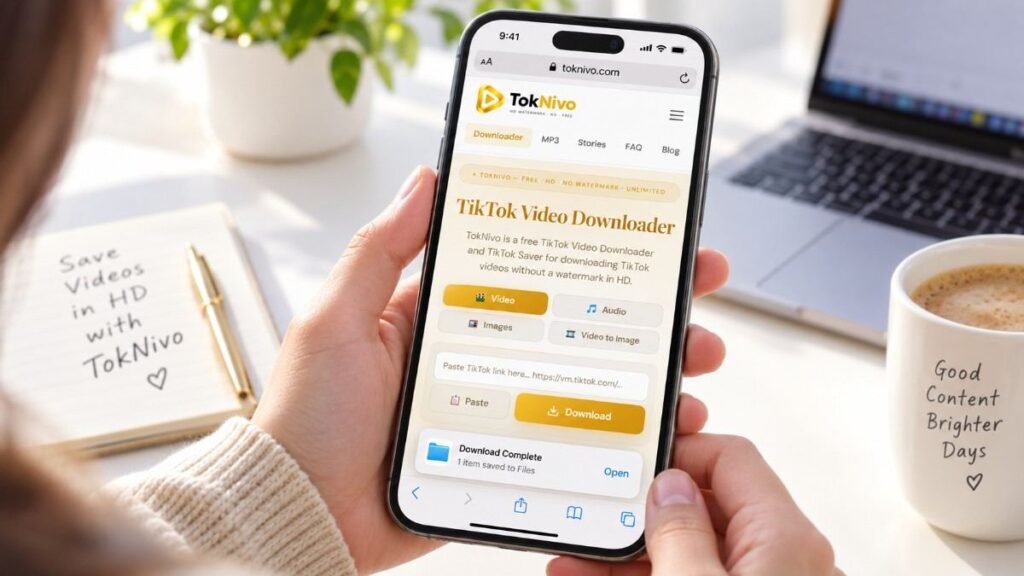
The process is similarly simple on an iPhone or iPad:
- Open the TikTok app.
- Tap Share on the required video.
- Select Copy link.
- Open Safari and go to TokNivo.com.
- Paste the link and tap Download.
- Choose the available video quality.
- Open Safari’s Downloads section after the file has been saved.
The downloaded video may initially appear in the Files app. To move it into Photos, open the file, tap the Share icon, and choose Save Video if that option is available.
This method generally works on current versions of iOS and iPadOS without requiring an additional application.
How to Save TikTok Videos on a PC or Mac

A desktop computer can be especially convenient when you want to organize your own videos or use them in an editing project.
Open TikTok in your browser and copy the link to the required post. Next, visit TokNivo, paste the URL, and choose a download option. The MP4 file should be saved in the download location configured in your browser.
On Windows, this is usually the Downloads folder. On macOS, you can normally find the file under Finder > Downloads.
You may rename the file and move it into a clearly organized folder. Creators backing up their own content could organize videos by campaign, publication date, topic, or social platform.
How to Get the Best Available Video Quality
If you want to download a TikTok video in HD, select the highest resolution shown by the downloader. The available quality is determined mainly by the source file.
For example, if the creator uploaded a 720p video, selecting or labeling it as 4K would not add real visual detail. The best downloader should preserve the highest available source quality rather than unnecessarily enlarging or compressing the file.
A few practical tips can help you obtain better results:
- Use a stable Wi-Fi or mobile-data connection.
- Select 720p or 1080p when available.
- Check the completed file before deleting another copy.
- Keep enough storage space available on your device.
- Avoid repeatedly converting the video between formats.
- Save your original recordings before uploading them to TikTok.
For most mobile screens, a clean 720p or 1080p MP4 offers a good balance between quality and file size.
Common TikTok Download Problems and Solutions
The TikTok Link Is Not Working
Copy the link again from the original post and ensure that no extra text was added. Links copied from messages or social posts can occasionally be incomplete.
The Video Cannot Be Found
The post may be private, deleted, region-restricted, age-restricted, or otherwise unavailable. TokNivo is intended for supported public TikTok content and should not be used to bypass access controls.
The Download Button Does Nothing
Refresh the page and try again. You can also disable strict pop-up blocking temporarily for the download page, clear your browser cache, or try another updated browser.
The Downloaded Quality Is Low
The original upload may only be available at a lower resolution. A TikTok HD downloader can preserve available quality, but it cannot restore detail that was never present in the source.
The File Is Not in the Photo Gallery
Check your browser’s Downloads section or your device’s Files application. On an iPhone, you may need to manually save the downloaded file to Photos.
Is It Safe to Use an Online TikTok Downloader?
A browser-based downloader can reduce the need to install unfamiliar software, but you should still use sensible security precautions.
A legitimate downloader should not require your TikTok password. You should never enter your TikTok login information into an unrelated download website. Be cautious if a page asks you to install an APK, browser extension, configuration profile, or unknown program before it will process a public video link.
You should also keep your browser updated and check every downloaded file before opening it. Video downloads are typically delivered as common media formats such as MP4 rather than executable files.
TokNivo states that its main downloader works through a browser without requiring an account or software installation. Users should nevertheless review the website’s current privacy policy and terms before using the service.
Is Downloading a TikTok Video Without Watermark Legal?
Removing a visible watermark does not transfer copyright or ownership. In most cases, the person who created the video continues to own their original work.

You should only download:
- Videos you created yourself
- Content for which you received permission
- Public-domain material
- Content covered by an appropriate licence
- Material whose use is otherwise permitted under applicable law
Do not present another creator’s work as your own, remove attribution to mislead viewers, sell unauthorized copies, or re-upload copyrighted content without permission. Music, performances, artwork, logos, and people shown in a video may involve additional rights.
Rules differ between countries, and exceptions such as fair use are context-specific. When uncertain, ask the creator for permission or obtain legal advice. You should also follow TikTok’s terms and intellectual-property policies.
Frequently Asked Questions
Can I download TikTok videos without installing an app?
Yes. TokNivo is an online TikTok downloader that works through a supported web browser. You do not need to install a separate application for ordinary public-link downloads.
Can I download private TikTok videos?
No. You should not use a downloader to bypass privacy settings or access restrictions. Only download supported public videos that you own or have permission to save.
Does TokNivo work on iPhone and Android?
Yes. You can open TokNivo in Safari, Chrome, or another modern mobile browser and paste the copied TikTok URL.
Can I download TikTok videos as MP4 files?
TokNivo provides video download options designed for common formats such as MP4. The precise options available may depend on the original post.
Can I save TikTok audio?
TokNivo includes audio-download options for supported public posts. Remember that music and spoken audio may be copyrighted, even when the associated video is publicly visible.
Where will my downloaded TikTok video be saved?
On Android, Windows, and macOS, it is usually saved in the Downloads folder. On an iPhone or iPad, it may first appear in Safari Downloads or the Files app.
Final Thoughts
Downloading TikTok videos without a watermark in 2026 does not need to involve complicated software. With TokNivo, you can copy the URL of an eligible public TikTok post, paste it into the online downloader, and choose from the media options available for that source.
The same basic method works across iPhone, Android, Windows, Mac, and tablets. For the best experience, use the original video link, select the highest genuine resolution available, and keep your browser updated.
Most importantly, download responsibly. Save your own videos, obtain permission when required, respect creators’ rights, and never use a watermark-free file to hide the identity of the original creator.
Ready to save an authorized public video? Visit TokNivo’s free TikTok video downloader and paste the TikTok link to get started.